The High Cost of a Slow Loading Screen in the California Market
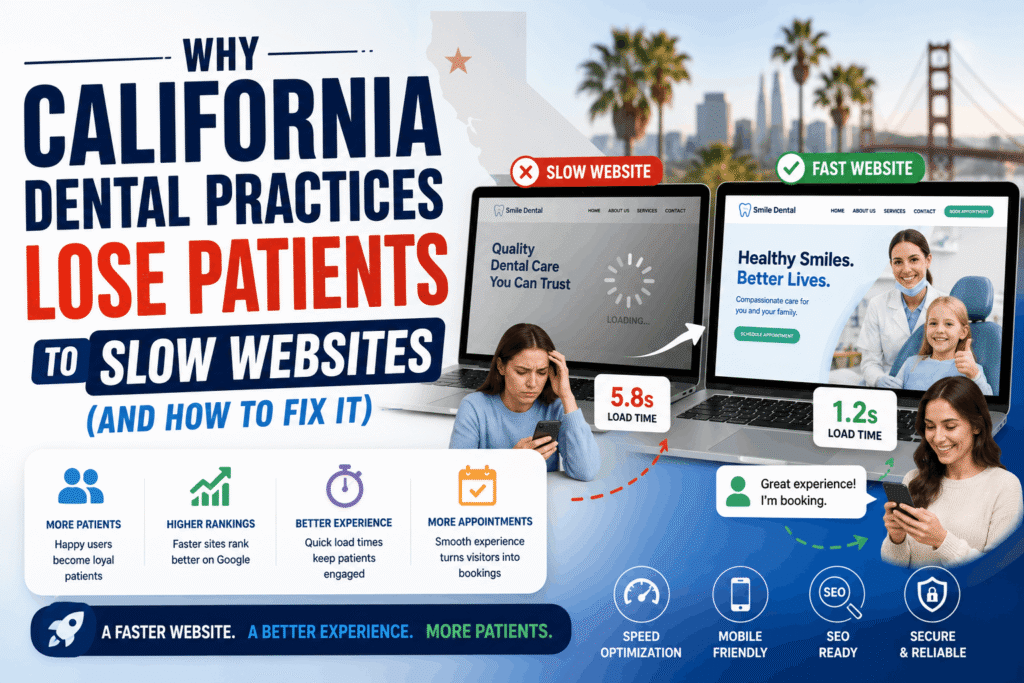
The California dental market is arguably one of the most competitive healthcare landscapes in the world. Patients here are overwhelmingly tech-savvy, mobile-first consumers who expect instant gratification. When a prospective patient in Los Angeles or San Francisco searches for an emergency dentist or a high-end cosmetic procedure on their smartphone, they are not willing to wait for a bloated website to load.
According to recent digital healthcare studies, if a medical website takes longer than three seconds to load, over 53% of mobile users will abandon the page and click on the next competitor in the Google search results. For a high-ticket California dental practice, a slow website doesn’t just mean a higher bounce rate—it translates directly to tens of thousands of dollars in lost annual revenue.
In this comprehensive guide, we will break down exactly why traditional dental websites suffer from critical performance issues, how Google’s algorithm penalizes them, and the advanced technical solutions required to dominate local California search engine optimization (SEO).
1. The Hidden Danger of Bloated Website Templates
The vast majority of dental practice websites are built using generic, off-the-shelf templates and drag-and-drop page builders. While these tools allow for quick visual design, they are an absolute disaster for technical performance.
When a patient lands on a templated site, their browser is forced to download massive libraries of unused code. These templates attempt to be “everything for everyone,” meaning they load hundreds of CSS stylesheets and JavaScript files that your specific clinic will never even use.
The Problem with External CDNs
Many web agencies rely heavily on external Content Delivery Networks (CDNs) to load fundamental styling frameworks and font libraries. While CDNs have a place in web development, relying on them for your core styling creates multiple DNS lookups and external network dependencies. If the patient is on a weak 4G connection while commuting, waiting for an external server to deliver CSS files causes a visible “flash of unstyled content” or a completely blank white screen.
The Modern Solution: High-performance web development has moved away from CDN reliance. By utilizing modern command-line interface (CLI) tools, developers can process and compile styles locally. This means the server only delivers the exact lines of code needed to render the page, resulting in a microscopic payload and instantaneous load times.
2. Understanding Google’s Core Web Vitals Mandate
Speed is no longer just a user experience preference; it is a strict ranking mandate enforced by Google. The search engine relies on a set of metrics known as Core Web Vitals to measure exactly how a user experiences your page’s speed, visual stability, and interactivity.
If your website fails these metrics, Google will actively suppress your ranking in the local “Map Pack” and organic search results, regardless of how many keywords you stuff into your page.
| Core Web Vital Metric | What It Measures | How Dental Sites Fail |
|---|---|---|
| Largest Contentful Paint (LCP) | Loading Speed: How long it takes for the largest visual element (usually the hero image or headline) to appear. | Using massive, uncompressed stock photos of the clinic or relying on slow server response times. |
| Interaction to Next Paint (INP) | Interactivity: How quickly the site responds when a user taps a button or opens a menu. | Heavy, render-blocking JavaScript from generic booking widgets freezing the main browser thread. |
| Cumulative Layout Shift (CLS) | Visual Stability: How much the page jumps around as different elements load in. | Loading custom fonts late or embedding third-party review widgets without declaring proper height dimensions. |
3. Beyond Basic Web App CRUD: The Need for ERP-Grade Layouts
Speed is not purely technical; it is also psychological. How a user perceives the speed and efficiency of your website heavily influences their decision to trust you with their healthcare.
A massive flaw in current dental web design is the reliance on basic “CRUD” (Create, Read, Update, Delete) data layouts. These are the clunky, multi-page architectures where a patient must click through five different loading screens just to find the accepted insurance list, read a doctor’s biography, and finally reach a contact form.
To capture high-intent California traffic, progressive clinics are moving toward fluid, ERP-grade interfaces. Instead of fragmented pages, these architectures utilize high data-density dashboards, smooth sliding panels, and unified canvasses. When a patient clicks to book an appointment, a glassmorphism overlay slides in instantly without reloading the page. This seamless, dashboard-level structure projects extreme technical competence, subconsciously reassuring the patient that your clinic operates with cutting-edge precision.
Want to see how a zero-bloat, highly fluid architecture looks in action? Explore our custom dental website design california services to see the difference an engineered platform makes.
4. Master Asset Optimization: Images and Video
Dental websites are inherently visual. To establish trust, you must showcase high-quality photography of your clinical staff, your waiting rooms, and your state-of-the-art operatory equipment. However, uploading raw, high-resolution JPEGs or PNGs directly from a photographer’s camera is the fastest way to destroy your local SEO rankings.
The WebP Compression Standard
Every single visual asset on a modern healthcare platform must be systematically routed through an optimization pipeline. Traditional image formats must be converted to next-generation formats like WebP or AVIF. These formats provide superior visual quality while reducing file sizes by up to 70%.
Strategic Lazy Loading
Furthermore, off-screen images should never load until the user scrolls down to see them. Implementing native browser lazy loading ensures that the initial homepage load focuses 100% of the network bandwidth on the critical above-the-fold content (like your headline and booking button), making the site feel instantly responsive.
5. Securing the Pipeline Without Sacrificing Speed
In the healthcare sector, speed cannot come at the expense of security. California dentists are subject to stringent HIPAA regulations and the California Consumer Privacy Act (CCPA). When a patient fills out a digital intake form, that data must be heavily encrypted in transit.
Many templated websites attempt to secure forms by stacking heavy security plugins on top of each other. This creates a massive bottleneck on the server, slowing down the time to first byte (TTFB). A properly engineered platform handles security at the architectural level. By utilizing tokenized API handlers and secure, server-side encryption routing, data is scrubbed and transmitted instantly without relying on heavy client-side JavaScript that bogs down the user’s browser.
Stop Losing Patients to Outdated Technology
The formula for local SEO success in California is no longer a secret: Google ranks the websites that provide the fastest, safest, and most frictionless user experiences. If your current website relies on bloated templates, unoptimized assets, and slow external networks, your marketing dollars are actively leaking to competitors who have invested in modern infrastructure.
Upgrading your clinic requires moving away from generic web builders and partnering with a team that understands true full-stack engineering. By deploying CLI-compiled styles, frictionless ERP-grade interfaces, and strict asset optimization, you can transform your website from a slow digital brochure into an aggressive patient-acquisition engine.
Ready to audit your current platform’s speed and security? At Perosite, we specialize in high-performance dental website design california clinics trust to scale their practice. Contact us today to secure your competitive advantage in local search.